# Welcome

## What the Hell is DeFihub?

DeFihub is the platform that transforms crypto investing from "complicated as hell" to "surprisingly pleasurable". Forget those confusing interfaces and technical terms that sound like a foreign language, we've created something that even your uncle who still uses Internet Explorer can understand (maybe).

We're a platform that automates crypto investment strategies, allowing you to buy tokens instantly, DCA (Dollar Cost Average) automatically, and provide liquidity to earn fees without needing a degree in decentralized finance.

## Why Should You Give DeFihub a Shot?

* **Strategy marketplace**: Trust your own financial genius or copy strategies from others who seem to know what they're doing. Better yet, create your own strategies and earn when others invest in them.
* **Automation that actually works**: Set it once and forget it. We handle the daily transactions while you handle your life (or just stare at charts, we're not judging).
* **Save on fees**: Pay gas ONLY for deposit and withdrawal transactions. We cover ALL execution fees in between. Yes, you read that right, we handle all the transaction costs while your strategy runs, saving you hundreds of dollars in gas fees over time.
* **Multi-chain without the headache**: Easily operate on Arbitrum, BSC, or Polygon with the same intuitive interface. No need to relearn everything for each blockchain.

### What Can You Do on DeFihub?

* **Buy tokens** instantly when that irresistible dip appears
* **DCA** to accumulate your favorite tokens without the anxiety of buying the top
* **Provide liquidity** to earn swap fees while your tokens work for you
* **Invest in strategies** created by the community with just a few clicks
* **Create your own strategies** and earn when others use your financial genius
* **Track your portfolio** with clear metrics and real-time updates

### Getting Started

Ready to explore the DeFihub universe? Our documentation breaks down everything you need to know about our platform's features and products. Check out these sections to become a DeFihub pro:

<table data-card-size="large" data-view="cards" data-full-width="false"><thead><tr><th></th><th data-card-target data-type="content-ref"></th></tr></thead><tbody><tr><td></td><td><a href="/products/strategies">Strategies</a></td></tr><tr><td></td><td><a href="/products/dollar-cost-average-dca">Dollar Cost Average (DCA)</a></td></tr><tr><td></td><td><a href="/products/liquidity-provision">Liquidity Provision</a></td></tr><tr><td></td><td><a href="/products/buy-tokens">Buy Tokens</a></td></tr></tbody></table>

Each section offers step-by-step instructions, helpful tips, and enough sass to keep you entertained while you learn. Whether you're a crypto newbie or a hardened DeFi veteran, our docs have something for everyone.


# Get Started

Guides to help you get started with DefiHub

Don't worry if you don't have a wallet yet or aren't sure how to connect it. You won’t need any sensitive data or information, just an internet connection. During the process, you’ll set up your wallet, write down your security phrase, and then you’ll be ready to start using your wallet on DeFihub and other Web3 platforms.

Once you’ve completed these steps, you’ll be able to store your cryptocurrencies, interact with decentralized applications, and start your investment journey on DeFihub.&#x20;

Let’s get started!

{% content-ref url="/pages/uao87DoFhTNnAsiXNBgG" %}
[How to set up a wallet](/get-started/how-to-set-up-a-wallet)
{% endcontent-ref %}

{% content-ref url="/pages/TaxlCK0Tu3FTI4V37hyQ" %}
[Connecting your wallet](/get-started/connecting-your-wallet)
{% endcontent-ref %}

When you're ready, check out our additional How-To Guides:\
\
**ADD LINKS**


# How to set up a wallet

In this guide, we’ll show you how to create your own MetaMask wallet, a simple process that should take no more than 10 minutes. By the end, you’ll be ready to explore the world of DeFi and make your

## Step 1: Download and install the MetaMask extension

* Open the browser of your choice (in this tutorial, we will use Google Chrome).\
  Go to the MetaMask website at [metamask.io](https://metamask.io).
* On the MetaMask website, click the "Download" button to go to the download page.

![](https://lh7-rt.googleusercontent.com/docsz/AD_4nXei7bu225GN5kT0QPhx5wHX4t00vbWSh6Cv-MUcZx4MHflVGd_jrt_f4HuGYS6nSuyyYUgFN72Z1wyrC715SUNcxF5dWlFOUJiJYL-g1Qzj7mztH4C6qRgOlo68ltQxZOB07ZJh05dGCK5okkU_nD1POBvj?key=EIPaJ6uHMnCOh1fqpXmT1g)

* On the download page, select the option to use the extension on your browser (for example, "Add to Chrome").

![](https://lh7-rt.googleusercontent.com/docsz/AD_4nXeyHe5CSprCTQnnGEHrmSXrJe1dwh6omJ8efwPds9wP-9FzQUgpJypXLj18UYeaqF6H2tk0r3wevxD_u9knvEK5AIcqcICIHQr_40Z1GiwJYvI3438mR6rhMbaYgBd9fTzrmBkr_PTGQ7OtcDgyLhjdM0Kr?key=EIPaJ6uHMnCOh1fqpXmT1g)

* Click on "Add to Chrome" (or another browser you are using) and then confirm by clicking "Add Extension".

![](https://lh7-rt.googleusercontent.com/docsz/AD_4nXdTk1vxRpLLsAp5Gg1x2p_jLZ_SizuWRaizULUOnYtGxpESp2p77Uf86l13Y5SueLz6VCBTXOzHjiZmnDlrewR2pw_xu52j3OuHFOk-MzJwMYHMGEPGGJ9fLe5CKR8bpzsCBMco-sZ8VGu_Tu9ArT04C30Y?key=EIPaJ6uHMnCOh1fqpXmT1g)

* After installation, MetaMask will be added to your browser extensions. Click on the MetaMask icon in the extensions bar to open it if it doesn’t open automatically.

## Step 3: Configure MetaMask

* Next, you will see the MetaMask wallet screen. Read and accept the terms of use by clicking on "Create a New Wallet".

![](https://lh7-rt.googleusercontent.com/docsz/AD_4nXd5leP1mqyHChkbbulVKvFFaFJNHEOUtGwzKtwOlXGuj79JJE7puNrACs_EvyYWGVTPwqhFgwz-zOkDvN4KMY1BkfCPCn9CyMe30uL-d5eXNt4eaIrAUDoh2jJe0PgwcgZ-E0rjweuOYZU8dAknHpLDVjWQ?key=EIPaJ6uHMnCOh1fqpXmT1g)

* On the "Help Us Improve MetaMask" screen, you can choose to share anonymous data by clicking "I Agree" or skip this step.

![](https://lh7-rt.googleusercontent.com/docsz/AD_4nXf9HLtJRiUswPDV3xXnWYQef4NSj4ABs9pI5_hPaNRgRq-J-jYt-eytgU311lANWfI7bxP_TLKKfllWQv7F42vXvKJkPWpAQ6oECXgYLbm7tsql6R7QRVwXc-_JrujeeUuMIP_SL5AIxLkycDTQblsLj14?key=EIPaJ6uHMnCOh1fqpXmT1g)

## Step 4: Create a Password

* Create a password with at least 8 characters. This password will be used to access your MetaMask locally.

![](https://lh7-rt.googleusercontent.com/docsz/AD_4nXdRGTD-VakwdBxU3K7D5DgbhmwRxr0RYcSWAEm7hL7oJMmlpjJlsBdqKLhk8Zngr8hAGyzG2CgXwNH5NDJL9sUSX7WYLl5eR57-OHTAFRcBGlnC6yTtcZduWz_c7ynJ5opsxoM6VjtreskByHqur549nSrC?key=EIPaJ6uHMnCOh1fqpXmT1g)

* Confirm your password by typing it again and click "Create" to proceed.

## Step 5: Protect Your Wallet

* After creating the password, an explanatory video will be displayed, providing tips on wallet security. Watch the video and then click "Secure My Wallet".

![](https://lh7-rt.googleusercontent.com/docsz/AD_4nXc8KbcI-UDoH2Df5aKWDbBURzz8hBtyuBL0mtpFjt15Y2jkqgOSB_Y5pZBbae_aG4Ga_oBUrtl5WZtSU72cc6y7-gyjT-jeBNnbYNNlOdDY01e6Y4asOofnYcABHbpM7WedB4nk5j2Rq4JWDD_4_OkDEgQ?key=EIPaJ6uHMnCOh1fqpXmT1g)

* Next, you will see the Secret Recovery Phrase. Click on "Reveal Secret Recovery Phrase" to view your secret words.

![](https://lh7-rt.googleusercontent.com/docsz/AD_4nXd3FtwYEO9WSgwWYO5WbWXy8RJQQFxaokQM4bUIBKp5J6uG7lqCknY3Q-4xHEcQrUyRSqWAFnafLHxMJ7aS2WMZes0HcqXf6TNqI4cVahGm0LY_MRmhUnOkI_gTynfYDLVD5q1cmjUQoiM65gIoJngYcgk?key=EIPaJ6uHMnCOh1fqpXmT1g)

## Step 6: Write Down and Store the Secret Recovery Phrase

* Write down the secret words in the correct sequence along with the numbers, or take a screenshot and store it in a safe place. This phrase is essential to access your wallet, so keep it extremely secure.\ <br>
* IMPORTANT: If you lose these secret words, you will not be able to access your cryptocurrencies. Therefore, store them in a reliable place.

## Step 7: Confirm the Secret Recovery Phrase

* On the next screen, you will need to confirm the Secret Recovery Phrase. Enter the words in the correct positions and click "Confirm".

![](https://lh7-rt.googleusercontent.com/docsz/AD_4nXfUw1BhvS1lDM4Kz4GySDBvB68R5C1whJH2dI8Bx7LjjYXniB7VZ_PUPRDm0Ypz1smj5wQrqiF7qS9GsH8bpXq7DDf3IaPtk7MBKdomad0sxXJUuSDrsW9uiuQLyBRWvpZXGObG0lZMYCh0d6I8R1eFLXlc?key=EIPaJ6uHMnCOh1fqpXmT1g)

## Step 8: Complete the Setup

* After confirming the phrase, you will see a success message. Click on "Got It" to proceed.

![](https://lh7-rt.googleusercontent.com/docsz/AD_4nXfvXJBH7YI-IOeBRK_EAPAVQ2o3BllGiqe2b1sOdWjr7_jIjDDMimyR7ktHeRLBbPo6DyqJjrcKPM3MLo6iwPMTH-Iz6miTKY5pOCbXLTJYrHf9IkyTnvMA9x_BuX-hT3_EdTiUttW8snzHinBkKpuKojE?key=EIPaJ6uHMnCOh1fqpXmT1g)

* MetaMask will show where to find your wallet in the browser. Click "Next" and then "Done" to finish.

![](https://lh7-rt.googleusercontent.com/docsz/AD_4nXfvobyJYpmydWKyncVZpzoUCFkMN_lV0WGER2QOPPRUkc4W36lr5JoNa2JiQksbcDj3MFk6HGHRBeMXiKqc0wlt2N1YU6B9OZ0zR1H_csU7BePrxiOATAq0h-rbwC8tm7X_N2y1PJsLWyB7KnVj18mcc36J?key=EIPaJ6uHMnCOh1fqpXmT1g)

![](https://lh7-rt.googleusercontent.com/docsz/AD_4nXdP_LC6SCxe2ngqn5JXtrwYGNKiYz7RtHUBR0BvJ89OyKaCTN_YL1sb42fnfVlxpDRIn36A56L8q4T2ZYoyD7MKEhsjVEV6Dm_MTqfyJ89Lgp0o47av0oNHDTSnGivpSILpmcgDhKmgib9fkPqRVlHJhIlH?key=EIPaJ6uHMnCOh1fqpXmT1g)

## Step 9: Access Your MetaMask Wallet

* After the setup, you will be taken to the main screen of your MetaMask wallet.\ <br>
* On this screen, you can view your wallet balance, make transfers, and interact with the DeFi world.

![](https://lh7-rt.googleusercontent.com/docsz/AD_4nXf0w6a_zyxVG1Ec1x3otEwRjDcYq8QVtDmd69OocCJsN-OvMgoNE-uho59UC_rFwbRlrqHxiMw67S4GBq5T-wwUw1Cxv9v8CgBu3DLJTWTV6_WbMsh50bUkKmkXkn2YqUVFxtx_kS9T9jS6f0jFgcLlvws?key=EIPaJ6uHMnCOh1fqpXmT1g)

## Conclusion

\
Now that you’ve completed the process of creating your MetaMask wallet, you’re officially ready to explore the vast ecosystem of decentralized finance. With your new wallet, you can interact with DeFihub and various other DeFi platforms in a secure and efficient manner.

Remember to always keep your recovery phrase safe and never share it with anyone. With this wallet, you have full control over your digital assets and can start making transactions, investing, and taking part in unique opportunities in the world of Web3.

Welcome to the future of decentralized finance! You’re now prepared to take full advantage of everything DeFi has to offer.

<br>

<br>


# Connecting your wallet

With your wallet now created, you're ready to take the next step: connecting your wallet to DeFiHub!

## 1. Click on the "Connect Wallet" buttton <a href="#id-1.-click-on-the-connect-wallet-buttton" id="id-1.-click-on-the-connect-wallet-buttton"></a>

The button can be found at the top of the page:

<mark style="color:red;">\[inserir imagem]</mark>

## 2. Select your wallet from the options

<mark style="color:red;">\[inserir imagem]</mark>

## 3. Approve the connection

<mark style="color:red;">\[inserir imagem]</mark>

You're all set! Now you're ready to explore the earning opportunities available on DeFiHub.


# Strategies

## What are Strategies?

Strategies on DeFihub are custom-built investment blueprints created by users and the community.&#x20;

Think of them as a cake recipe, but for managing investments, where you mix and match different products to suit your taste. You can invest in strategies created by other people or design one tailored to your goals by combining the following key products:

* [**Buy**](/products/buy-tokens): For when you want tokens immediately and don't want to miss that dip that's definitely not going to dip further (wink).
* [**DCA (Dollar Cost Averaging)**](/products/dollar-cost-average-dca): For when you finally accept that nobody knows what the markets will do next, so you spread your bets like a responsible adult.
* [**Liquidity**](/products/liquidity-provision): For when you want your money to work while you scroll through memes, earning fees from decentralized exchanges.

With just one click, you can diversify your wallet across multiple products, taking advantage of a broad range of tokens to manage risk and maximize returns, all without the need for constant active management.

## **Navigating the Strategies Section**

Access the Strategies page by clicking the "[Strategies](https://www.defihub.fi/strategies/invest)" link in the navigation bar. This leads to a dedicated page showcasing all available strategies that you can sort and filter by various metrics such as performance, popularity, products types and tokens composition.

{% hint style="info" %}
You can click on any strategy for a detailed view.
{% endhint %}

Each strategy on DeFihub offers detailed information to help you decide which one best fits your investment goals. [For more guidance on choosing a strategy, check out the "**Investing in Strategies"** section in our documentation](/products/strategies/investing-in-strategies).

<table data-card-size="large" data-view="cards" data-full-width="false"><thead><tr><th data-type="content-ref"></th><th></th></tr></thead><tbody><tr><td><a href="/products/strategies/investing-in-strategies">Investing in Strategies</a></td><td>Discover how to browse, filter, and invest in user-created strategies on DeFihub.</td></tr><tr><td><a href="/products/strategies/creating-strategies">Creating Strategies</a></td><td>Learn how to design, build, and share your own investment strategies that earn you fees when others invest.</td></tr></tbody></table>


# Investing in Strategies

## How to pick a strategy to invest?

There are many factors to consider when picking a strategy, here we'll cover the most important:

#### Deposits

This is the total amount invested in the strategy. A higher deposit sum often indicates that many investors have confidence in it... or that you've stumbled upon the latest crowd favorite. Either way, it's worth noting!

<div align="left"><figure><img src="https://273844892-files.gitbook.io/~/files/v0/b/gitbook-x-prod.appspot.com/o/spaces%2FInl83e0L0SWx07DwslNS%2Fuploads%2F5PQzhRnkz6C8B4U3hNmT%2Fimage.png?alt=media&amp;token=b70db071-37e2-4b8d-8020-f5a77635bb76" alt="" width="244"><figcaption></figcaption></figure></div>

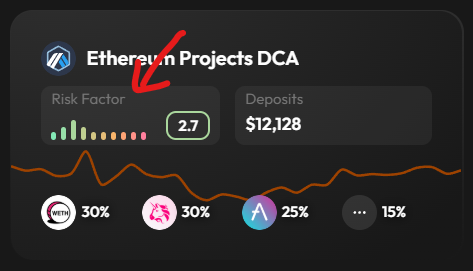
#### Risk Factor

This metric estimates how likely you are to wake up in a cold sweat checking your portfolio at 3 AM. A higher risk factor means more potential volatility, which can lead to higher returns, but also higher losses. If you're new to investing, maybe start with something less risky, your future self with a positive account will thank you.

<div align="left"><figure><img src="https://273844892-files.gitbook.io/~/files/v0/b/gitbook-x-prod.appspot.com/o/spaces%2FInl83e0L0SWx07DwslNS%2Fuploads%2FWVVe99POPYe4KcqdBGeM%2Fimage.png?alt=media&amp;token=bc6c4080-9e2f-4428-a8e5-a30b705b59c8" alt="" width="237"><figcaption></figcaption></figure></div>

#### Tokens

The Tokens section gives you a sneak peek at what's actually in the strategy's underwear drawer. Here you'll see which tokens are included and what percentage of your funds will be allocated to each one. "60% ETH, 30% BTC, and 10% in some token that sounds like a sneeze? Interesting choice!" This preview helps you quickly identify if the strategy aligns with your crypto taste buds without having to go all the way. Want the full-frontal details about which products are using these tokens? Just click the strategy card to dive deeper and see exactly how these tokens are being put to work.&#x20;

<div align="left"><figure><img src="https://273844892-files.gitbook.io/~/files/v0/b/gitbook-x-prod.appspot.com/o/spaces%2FInl83e0L0SWx07DwslNS%2Fuploads%2FNNdq49N4U2tKQnyfSJF8%2Fimage.png?alt=media&amp;token=f40126f7-535e-40aa-936c-9c380057f683" alt="" width="241"><figcaption></figcaption></figure></div>

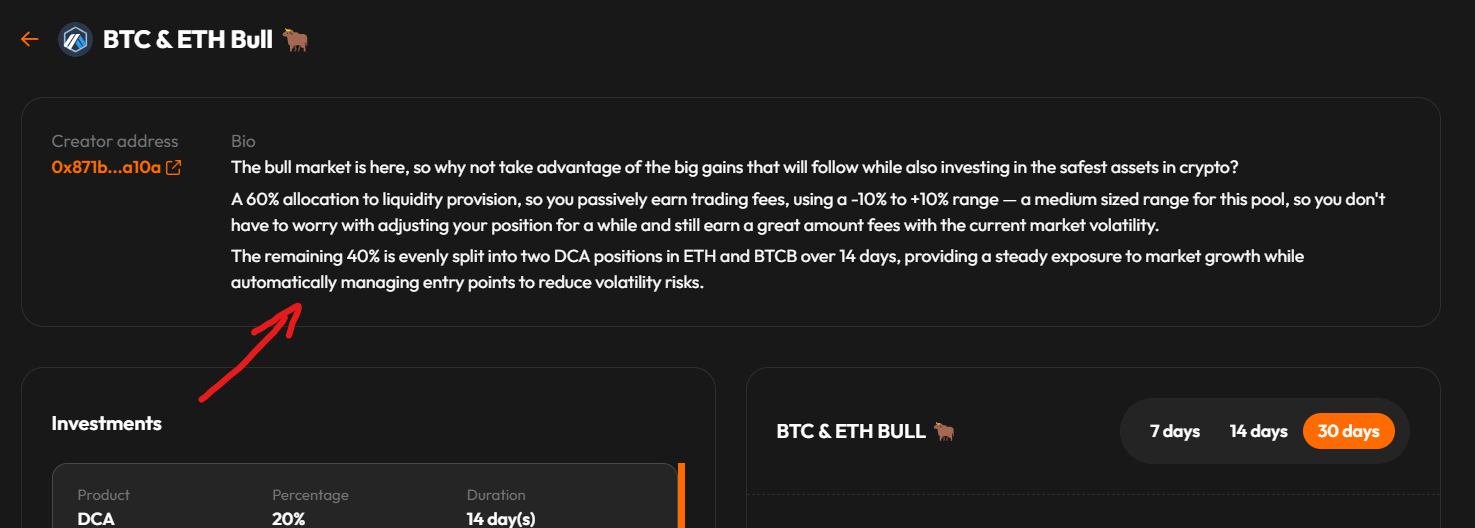
#### Strategy Bio

Last but not least, don’t skip the strategy bio. It usually explains why the strategy was built and what it aims to achieve. This info can be really useful in deciding if it matches your investment goals.

<div align="left"><figure><img src="https://273844892-files.gitbook.io/~/files/v0/b/gitbook-x-prod.appspot.com/o/spaces%2FInl83e0L0SWx07DwslNS%2Fuploads%2FGnCvQBk4507qno0ZPvV4%2Fimage.png?alt=media&amp;token=cb1db0ec-d6da-40d4-a07f-f58a83cdb629" alt="" width="375"><figcaption></figcaption></figure></div>

#### Performance

Past performance gives you an idea of how volatile a strategy might be, but don’t make it your only deciding factor. Sometimes a lower-performing strategy can be a hidden gem, while other times it might be a red flag. Think of it as one clue in the bigger picture.

<div align="left"><figure><img src="https://273844892-files.gitbook.io/~/files/v0/b/gitbook-x-prod.appspot.com/o/spaces%2FInl83e0L0SWx07DwslNS%2Fuploads%2F4mWek2CR39Bsg8Bmkk2z%2Fimage.png?alt=media&amp;token=b689b165-2d86-4255-9614-8a69f8d1f122" alt="" width="362"><figcaption></figcaption></figure></div>

#### Products

Each strategy can pack up to 20 different product positions – multiple DCAs, Buy orders, and Liquidity pools. Don't just stare at each product individually, that's like watching only one scene and missing the whole plot. When checking out a strategy, look at the full package – how they've mixed quick-fix [Buy](/products/buy-tokens) orders with the slow-burn of [DCA](/products/dollar-cost-average-dca) and the passive action of [Liquidity](/products/liquidity-provision) pools.

<div align="left"><figure><img src="https://273844892-files.gitbook.io/~/files/v0/b/gitbook-x-prod.appspot.com/o/spaces%2FInl83e0L0SWx07DwslNS%2Fuploads%2F3SZN9yqkK9cInMDWLpL6%2Fimage.png?alt=media&amp;token=155794a3-fb7e-46d9-ac0d-2e6180ee1d0e" alt="" width="361"><figcaption></figcaption></figure></div>

## How can I invest?

1. Access the Strategies page from the dashboard or through the link: [Strategies](https://www.defihub.fi/strategies/invest).
2. Choose a strategy you want to invest and click on the card.
3. Connect your wallet.
4. Enter the amount you want to invest or click "MAX" if you're feeling particularly bullish :ox:.
5. Approve the Strategies contract to spend your tokens, either by clicking "**Approve all txs**" or "**Approve one tx**", and then send the deposit transaction by clicking the "**Deposit**" button.
6. Confirm the transaction on the modal that will popup and then on your wallet.

## How to manage your positions?

In the **Positions** tab you can view all your active and closed positions in one place, both open and closed. It gives you an overview of your balances, total invested amounts, and current profits. You’ll also see which tokens you hold and easily manage each position.

#### Collect Position

Clicking the **"collect"** button will claim tokens from your position coming from the following sources:

* Tokens purchased from DCA (output tokens only, for example: WBTC in a USDC ⇒ WBTC pool)
* Tokens purchased using BUY
* Fees earned from Liquidity Pools

#### Close Position

Clicking the **"Withdraw All"** button will close the position, meaning you will collect everything, including:

* Everything from the "collect" button
* DCA input tokens (for example: USDC in a USDC ⇒ WBTC pool)
* Undo liquidity pool and get the underlying tokens (maybe make this term more readable to beginers)

#### See Detailed Position

{% hint style="info" %}
This is a highly requested feature and and is in development! Once available, it will let you explore the details of your position, from a timeline of DCA swap prices to a breakdown of liquidity fees and staked assets.
{% endhint %}


# Creating Strategies

So you fancy yourself a financial genius? Well, now you can prove it by creating your own investment strategies on DeFihub, and unlike your unsolicited stock tips at family dinners, people might actually pay attention here. When users invest in your masterpiece of financial engineering, you earn a cut of the action. That's right, passive income for your active brain cells.

Think of it as opening your own digital hedge fund, minus the fancy office and obligation to explain your losses to angry investors face-to-face. Your strategy gets showcased in the marketplace alongside the big boys, giving everyone access to your ~~questionable~~, I mean, innovative, investment ideas. Whether you're the next Warren Buffett or just someone who thinks they understand crypto because they once bought "the dip" (before it dipped again), this is your chance to shine.

Each deposit into your creation puts tokens in your pocket while you sleep, shower, or brag about your returns at parties. So channel your inner financial wizard and create a strategy that makes people wonder, "Why didn't I think of that?"

## How to Create a Strategy

{% hint style="info" %}
Creating a strategy is 100% free, but like any blockchain interaction, you'll need some gas[^1] to send the transaction. Make sure your wallet is connected to DeFihub before you start, unless you enjoy the special pain of setting everything up twice.
{% endhint %}

### **1. Name** your strategy

Give it something catchy that screams "financial genius at work." Or just name it after your pet. Whatever floats your boat.

### 2. Select a chain

{% hint style="danger" %}
Changing chains mid-creation will RESET ALL INVESTMENT CONFIGURATION faster than you can say "I should have read the warning."
{% endhint %}

Different chains offer different tokens, so choose wisely between:

* Arbitrum
* BNB Smart Chain (BSC)
* Polygon

### 3. Craft Your Strategy Bio

This is where you convince others you know what you're doing. Write something insightful about market trends and token fundamentals, or just admit you're throwing darts at a chart. Your choice.

{% hint style="info" %}
Pro tip: Complete your investments first so you can actually describe what your strategy does.
{% endhint %}

### 4. Setup your investments

Here's where the magic happens. Mix and match three types of investments until you reach 100% allocation, which you can track with the handy **percentage counter**:

<figure><img src="https://273844892-files.gitbook.io/~/files/v0/b/gitbook-x-prod.appspot.com/o/spaces%2FInl83e0L0SWx07DwslNS%2Fuploads%2FrWoQbPC9REVOUCl2sZSn%2Fimage.png?alt=media&amp;token=a2cf15a3-2309-4848-8ca3-994347e7c740" alt=""><figcaption></figcaption></figure>

When selecting a product, click the "**Product**" box to open a modal showing all available options. Then set a **percentage**, this is how much of your investors' money goes into each part of your strategy.&#x20;

The "**Product**" and "**Percentage**" fields are highlighted below for those who struggle with basic UI elements (not you, of course).

<figure><img src="https://273844892-files.gitbook.io/~/files/v0/b/gitbook-x-prod.appspot.com/o/spaces%2FInl83e0L0SWx07DwslNS%2Fuploads%2F4LZez8z2VieSWEcmoEd9%2Fimage.png?alt=media&amp;token=e22175d4-738e-44e7-808c-695a4145e39c" alt=""><figcaption></figcaption></figure>

Want to create a strategy that actually makes sense? Check out the detailed guides for each investment type:

* [How to setup a DCA investment](/products/dollar-cost-average-dca#how-to-add-dca-to-your-strategy) (for the patient accumulators)
* [How to setup a Buy investment](/products/buy-tokens#how-to-add-buy-tokens-to-your-strategy) (for the decisive "buy now" folks)
* [How to setup a Liquidity investment](/products/liquidity-provision#how-to-add-liquidity-provision-to-your-strategy) (for the passive income seekers)

Once you've set up your first investment, click "**Add Investment**" to add more components. This is how you transform from basic strategy creator to investment influencer with a cult following.

<figure><img src="https://273844892-files.gitbook.io/~/files/v0/b/gitbook-x-prod.appspot.com/o/spaces%2FInl83e0L0SWx07DwslNS%2Fuploads%2F5cJzZldgiBfHvwqNPgYI%2Fimage.png?alt=media&amp;token=85ce764a-cbbd-4a65-bc3a-c41efe46adbf" alt=""><figcaption></figcaption></figure>

### 5. Review and Launch

Double-check everything is tight and ready to deploy. Hit the publish button, confirm the transaction in your wallet, and congratulations, you're now officially in the strategy business! Share your creation with friends, followers, or random strangers on the internet and watch as the fees roll in every time someone invests in your brainchild.

Remember, the more people who use your strategy, the more you earn, so maybe it's time to finally put those social media accounts to good use. Your followers can finally put their money where your mouth is, and you can finally put their money in your wallet.

[^1]: Native token of a chain (ETH in Arbitrum, or POL in Polygon)


# Dollar Cost Average (DCA)

Your Crypto Investment Autopilot

## What is Dollar Cost Averaging (DCA)?

Tired of screaming at your screen because you bought the "top" again? Welcome to Dollar Cost Averaging (DCA), the investment strategy for people who finally admit that no one can time the market.

DCA breaks your investment into smaller, regular purchases over time instead of blowing your entire bankroll at once. It's like eating one cookie a day instead of the whole package in one sitting - less regret, better results. By spreading out your buys, you catch the highs AND the lows, giving you a balanced average price that won't keep you up at night.

## How DeFihub provides DCA

At DeFihub, we've turned the boring old DCA concept into something that actually gets us excited (and not just because of our logo). Need a helping hand? Our platform does all the heavy lifting automatically, so you can set and forget.

Here's what makes our DCA system better than your ex:

* **Set your parameters once**: Pick your tokens, set your amount, choose how long – done. No need to come back tomorrow, or the next day, or the... you get it.
* **Gas fees? What gas fees?**: Pay gas ONCE for your deposit. That's it. We cover ALL subsequent gas and swap fees. Yes, you read that right, we're basically paying you to use our platform (not really, but it feels that way).
* **Time is money, honey**: No more setting alarms to catch "the best time to buy." Your DCA runs on autopilot, executing trades at regular intervals while you focus on more important things, like deciding which color Lambo you'll buy with your gains.
* **Consistency is key**: Like actually showing up to the gym, consistent investing beats sporadic panic buys and sells every time. We keep you disciplined even when crypto Twitter is losing its mind.

## DCA in Action: Quick Step Guide

Setting up a DCA on DeFihub is easier than explaining Bitcoin to your grandmother:

### **1. Find the DCA section**

Head to the DCA page from our dashboard or just click [DeFihub DCA](https://defihub.fi/dca) (we know you're lazy, we got you).

<figure><img src="https://273844892-files.gitbook.io/~/files/v0/b/gitbook-x-prod.appspot.com/o/spaces%2FInl83e0L0SWx07DwslNS%2Fuploads%2FZUEBlP89ZUMpSqiFITSy%2FDCA1.png?alt=media&amp;token=0076fef9-351b-43c0-af0c-a9a7584997b1" alt="" width="375"><figcaption></figcaption></figure>

### **2. Connect your wallet**

Pick your poison: MetaMask, Trust Wallet, or even the lazy route via Google sign-in. No judgment here, as long as you've got some tokens to play with.

<figure><img src="https://273844892-files.gitbook.io/~/files/v0/b/gitbook-x-prod.appspot.com/o/spaces%2FInl83e0L0SWx07DwslNS%2Fuploads%2FASv6NmzgN4XQqJSXx0eb%2FDCA3.png?alt=media&amp;token=42415fbf-387d-4a6f-8972-656dba158153" alt="" width="375"><figcaption></figcaption></figure>

### **3. Set up your investment strategy**:

* **Pick your network**: Arbitrum One, BNB Smart Chain, or Polygon (they're like different neighborhoods, each with their own vibe).
* **Choose what to SELL**: Select the token that's burning a hole in your digital pocket.
* **Choose what to RECEIVE**: Pick the token you believe in long-term (or the one your favorite influencer won't stop tweeting about).
* **Decide how much**: Enter your amount or hit MAX if you're feeling spicy.
* **Set your timeframe**: Choose how many days you want to spread your daily purchases over. 14 days, 30 days, or a custom period that suits your investment appetite.

<figure><img src="https://273844892-files.gitbook.io/~/files/v0/b/gitbook-x-prod.appspot.com/o/spaces%2FInl83e0L0SWx07DwslNS%2Fuploads%2Fougpe4e9tzq916qOkeKD%2FDCA2.png?alt=media&amp;token=72591557-75d3-442d-b051-737b9e0bc252" alt="" width="375"><figcaption></figcaption></figure>

### **4. Double-check everything**

We know you make mistakes when you're excited, so take a second to review.

### **5. Approve and deposit**

Hit "Approve all txs" if you're in a hurry or "Approve one tx" if you have trust issues, then smash that "Deposit" button.

<figure><img src="https://273844892-files.gitbook.io/~/files/v0/b/gitbook-x-prod.appspot.com/o/spaces%2FInl83e0L0SWx07DwslNS%2Fuploads%2FkwebBjHBMH8rz8TYOLzT%2FDCA4.png?alt=media&amp;token=acc70258-b9c9-48e8-ac18-173203bf6826" alt="" width="375"><figcaption></figcaption></figure>

### **6. Let us handle the rest**

We'll execute your purchases every day for the duration you selected, while you pretend you're a financial genius to your friends.

### **7. Track your progress**

Check the 'POSITIONS' tab anytime to see how your investment is performing. Watch your tokens steadily accumulate regardless of market drama, it's like having a robot that buys the dip, the peak, and everything in between while you focus on more important things, like debating crypto on Twitter.

<figure><img src="https://273844892-files.gitbook.io/~/files/v0/b/gitbook-x-prod.appspot.com/o/spaces%2FInl83e0L0SWx07DwslNS%2Fuploads%2FBaSRn5UOPFBkSvHPuK9y%2FDCA5.png?alt=media&amp;token=074330a0-5638-4ff1-a823-a6325bbeb5e8" alt="" width="563"><figcaption></figcaption></figure>

## How to Add DCA to Your Strategy

While DCA has its own dedicated page for pure dollar-cost averaging bliss, it's also a versatile component you can add to your custom investment strategies. Think of it as the reliable partner in your investment portfolio, always performing when and how you need it.

Here's why adding DCA to your strategy is like discovering premium content with no subscription fee:

* **Mix and match with other products**: Combine DCA with Buy and Liquidity products for a well-rounded investment portfolio that hits all the right spots.
* **Multiple DCA positions**: Create a strategy with multiple DCAs using different token pairs and timeframes, like having multiple tabs open but without the guilt.
* **Diversification made easy**: Allocate different percentages of your funds across various DCA setups to spread your risk while keeping that ~~sweet, sweet~~ automation.

### Investment Setup

Setting up a DCA within your strategy is straightforward, even after a few drinks:

1. **Select the "DCA" product**: From your strategy creation panel, choose DCA as one of your investment types.
2. **Set the percentage**: Decide how much of your total investment you want to allocate to this specific DCA. Remember, the total allocation across all your investments needs to add up to 100%, just like how you give 100% of your attention to charts (and not your significant other).
3. **Pick your token pair**:
   * **Input token**: This is what you're willing to part with.
   * **Output token**: This is what you're looking to accumulate over time and eventually show off about.
4. **Select the duration in days**: How long do you want this automated love affair to last? Choose a timeframe that matches your investment goals and commitment issues.

<figure><img src="https://273844892-files.gitbook.io/~/files/v0/b/gitbook-x-prod.appspot.com/o/spaces%2FInl83e0L0SWx07DwslNS%2Fuploads%2FOuemUWMLyHRGcUv6pc5P%2FDCA6.png?alt=media&amp;token=2742cf4e-236d-4ea9-ba9c-43659e2e36b5" alt=""><figcaption></figcaption></figure>

Remember, with DCA in your strategy, you're not just investing, you're letting your money work for you while you work on your excuses for why you didn't become a crypto millionaire sooner.


# Liquidity Provision

Liquidity provision is a way to let your tokens work for you by pooling them with others on a decentralized exchange.&#x20;

When you deposit your tokens into a liquidity pool, you help **facilitate trades** between different tokens without needing a direct buyer or seller at that moment. Every time someone makes a trade, you earn a small fee.

This generates **passive income** for you, though it comes with risks like **impermanent loss**, if the token values change a lot, you might end up with a different balance than you started with. In short, if you're comfortable with a bit of market unpredictability and want your idle tokens to earn money, liquidity provision can be a smart move.

{% embed url="<https://www.youtube.com/watch?v=ClWR1570UQw>" %}

## How to add Liquidity Provision to your strategy

Liquidity may seem complex to setup, but it can also be the most rewarding in terms of profits if setup correctly.&#x20;

{% hint style="info" %}
Make sure you are already familiar with **creating a strategy**, otherwise take a moment to [read the strategy creation](/products/strategies/creating-strategies) guide before continuing!
{% endhint %}

### Recommended Tools

When creating liquidity pools there are some **tools to assist you** picking optimal exchanges, token pairs and ranges, here are some of them:

* [Poolfish](https://poolfish.xyz/): Simulate a position before its creation, this is a powerful tool to assist you on picking the correct range, but take it with a grain of salt as past performance don't mean future returns.
* [Revert](https://revert.finance/#/initiator?network=arbitrum\&exchange=uniswapv3): Another position simulator, great for analysing ranges and with a "backtesting" functionality to see how that pool would have performed, including impermanent loss calculation.

### Investment Setup

* Select the "**Liquidity**" product.
* Set the percentage of the total investment that you want to allocate for this specific **Liquidity Pool**.
* Pick the **two tokens** you want to add liquidity for.
* Select the **Exchange** you want to add liquidity to, available exchanges will vary based on the selected chain of the strategy, different exchanges may have different pools and different returns.
* Select one of the fee tiers available, the one with the higher usage percentage (represented by "**x% Pick**") is usually the best option, but it is always nice to validate that using the [recommended tools](#recommended-tools) above.
* Now the last and most important, selecting the range, this can be broken down in the following steps:
  * **Inverting Tokens:** Click the "**USDC per WBTC**" button (or the equivalent for your pair) to invert the token order. This displays the price of the more expensive token over the less expensive one. For example, showing 100,000 USDC per BTC instead of 0.00001 BTC per USDC, which is much easier to read.

    <figure><img src="https://273844892-files.gitbook.io/~/files/v0/b/gitbook-x-prod.appspot.com/o/spaces%2FInl83e0L0SWx07DwslNS%2Fuploads%2FFqy3eeAojvolnlw91MkB%2Fimage.png?alt=media&amp;token=5e6c0ca6-b021-404a-8845-9bab8d13c8ef" alt=""><figcaption></figcaption></figure>

### **Setting Your Price Range**

When setting up a liquidity investment, you're choosing between two options: **Real-Time** or **Pre-Set** ranges. Think of it as customizing your experience, one adapts to market conditions when you invest, the other stays exactly as the creator intended.

* **Real-Time Range** vs **Pre-Set Range**:
  * **Real-Time Range -** Uses the current market prices when you invest. If a strategy creator set a range of -10% to +20%, and you invest when BTC is at $60,000, your position will be created with a range from $54,000 to $72,000. If another investor joins the same strategy a month later when BTC is at $70,000, their position will have a different range: $63,000 to $84,000. The strategy stays valid forever, but your specific position can still go out of range as prices move, just like any liquidity position. What's "timeless" is the strategy itself, not your position's profitability.&#x20;
  * **Pre-Set Range -** Uses fixed price points that the strategy creator defined. If they set a specific range of $54,000 to $72,000 for BTC, this exact range applies whether you invest today or months later, regardless of BTC's current price. This approach works best when the creator has strong convictions about a specific price zone. If the market moves significantly away from this range, your position will stop earning fees until prices return to the specified band.

Remember, choosing the right range type is like choosing the right dating app, it all depends on what you're looking for and how committed you are to your position.

<figure><img src="https://273844892-files.gitbook.io/~/files/v0/b/gitbook-x-prod.appspot.com/o/spaces%2FInl83e0L0SWx07DwslNS%2Fuploads%2FOUFrJgq0zBdVjv3cg3vO%2Fimage.png?alt=media&amp;token=7decc625-66d3-4707-9cba-8ab19ee37eb1" alt=""><figcaption></figcaption></figure>

* **Setting the Bounds**: Adjust the upper and lower range limits by entering values on the right or by dragging the slider on the left. You can also fine-tune each value using the "**-**" and "**+**" buttons.

  <figure><img src="https://273844892-files.gitbook.io/~/files/v0/b/gitbook-x-prod.appspot.com/o/spaces%2FInl83e0L0SWx07DwslNS%2Fuploads%2F1R4dIOii3lZcufaM1sZJ%2Fimage.png?alt=media&amp;token=d8e210a7-3135-49c2-8a52-105131cb6f62" alt=""><figcaption></figcaption></figure>


# Buy Tokens

Instant Gratification for Your Crypto Cravings, get some exposure right away while your other positions build over time.

Buy Tokens lets you swap one token for another immediately at the current market price. It's for those moments when you see a dip worth buying or when FOMO hits you harder than your hangover on Sunday morning.

## Why add Buy Tokens to your Strategy?

* **Immediate market entry**: Get some skin in the game right away while your other positions accumulate gradually.
* **Buy the dip**: Instantly buying tokens can be your moment of glory when the market is down, if you time it right (which, let's be honest, you probably won't, but it feels good to try).
* **Combine with other products**: Mix immediate purchases with DCA and Liquidity for a portfolio that satisfies all your investment urges.

## How to Add Buy Tokens to Your Strategy

Setting up a Buy position within your strategy is so easy even your crypto-skeptic grandma could do it:

1. **Select the "Buy" product**: From your strategy creation panel, choose Buy as one of your investment types.
2. **Set the percentage**: Decide how much of your total investment you want to allocate to this immediate purchase. Remember, the total allocation across all your investments needs to add up to 100%.
3. **Pick your token**: Select which token investors will immediately acquire when they use your strategy. This is the asset they'll own from the moment they invest.

<figure><img src="https://273844892-files.gitbook.io/~/files/v0/b/gitbook-x-prod.appspot.com/o/spaces%2FInl83e0L0SWx07DwslNS%2Fuploads%2FI1HG2wRyGGBGR510t4GA%2FBuy.png?alt=media&amp;token=0bad77dc-0e95-4cc7-bc9d-e60a0aa356af" alt=""><figcaption></figcaption></figure>

That's it. No duration to set, no parameters to tweak, just pure, simple token acquisition. It's the one-night stand of crypto investments: quick, straightforward, and with immediate results.


# Hottest Deals

Overview of Hottest Deals Feature

The **Hottest Deals** feature highlights the most successful and popular strategies in the marketplace. Every cycle, the top 10 strategies are showcased based on key metrics like:

* **Monetary Volume (4x Weighting)**: Measures the financial success of a strategy based on total investment.
* **Deposit Volume (4x Weighting)**: Assesses the popularity of a strategy by counting the total deposits and users.
* **Community Votes (2x Weighting)**: Reflects community preference, showing which strategies have received the most upvotes.

These top strategies benefit from increased visibility and reward the strategists behind them, creating an environment where success is shared.


# Safety

DeFiHub takes security seriously, leveraging the power of blockchain to ensure safe and transparent transactions. All strategies and transactions are executed via smart contracts, which are immutable and trustless. Our multi-chain support on networks like Arbitrum and Binance Smart Chain adds an additional layer of flexibility while maintaining top-tier security standards.

Additionally, as a non-custodial platform, DeFiHub never holds your assets—users retain full control at all times. This decentralized structure eliminates the risks associated with centralized platforms, such as hacks or mismanagement of funds.


# General

Let us know if you have any other question. Join us on Discord!

#### What is DeFiHub?

DeFiHub is a decentralized finance platform that simplifies crypto investments through automated strategies like Dollar Cost Averaging (DCA) and a collaborative marketplace where users can share and adopt investment strategies.

#### How does DeFiHub work?

DeFiHub operates on a decentralized, non-custodial protocol that automates investment strategies via smart contracts. Users have full control over their assets and can use the platform to automate DCA or participate in the marketplace of investment strategies.

#### What is Dollar Cost Averaging (DCA)?

DCA is an investment strategy where users buy a fixed amount of cryptocurrency at regular intervals, spreading out purchases over time to reduce market volatility. DeFiHub automates this process to make it simple and consistent.

#### How do strategy creators get rewarded?

When a strategy created by a user is adopted by others in the marketplace, the creator earns a portion of the platform’s revenue generated by that strategy. This incentivizes the creation and sharing of successful investment approaches.

#### How safe is DeFiHub?

DeFiHub is built with security and transparency at its core, utilizing blockchain technology and smart contracts to ensure all transactions are trustless and transparent. The platform is non-custodial, meaning you always control your funds.

***


# Community

Join the DeFiHub community and stay connected with fellow investors and strategists!

By joining our channels, you can share ideas, get the latest updates, and participate in discussions that shape the future of the platform. Whether you're looking for support, feedback, or collaboration, our community is here to help.

&#x20;Follow us on social media, join our forums, and be part of the DeFiHub ecosystem!